An Introductory Guide to ChatGPT Ads

Why Advertise on ChatGPT?

ChatGPT has quickly become more than just an AI chatbot. Millions of people now use it to research products, compare services, brainstorm ideas, and get recommendations before making purchasing decisions. As conversational AI continues to grow, advertisers have a new opportunity to reach users in a completely different way than traditional search or social media platforms.

When we first wrote about ChatGPT Ads, the platform was still in its early stages. Since then, OpenAI has introduced advertising capabilities that allow businesses to create campaigns, define objectives, manage budgets, track conversions, and measure performance. In this guide, we’ll walk through everything you need to know to get started with ChatGPT Ads, from setting up your account to launching and optimizing your campaigns.

A person typing on a laptop keyboard with charts displayed in the air above their hands.

Setting Up Your ChatGPT Advertising Account

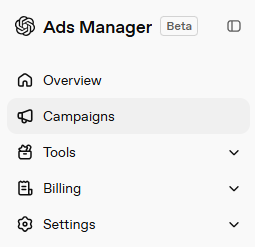
Before you can launch your first campaign, you’ll need access to OpenAI’s Ads Manager. Since ChatGPT Ads are still rolling out, advertisers may need to request access and complete a business verification process before creating campaigns. Once your account is approved, you’ll be able to log in to Ads Manager. There, you can create campaigns, manage budgets, upload creatives, and monitor performance, all from one dashboard.
Step 1: Create an Ads Account

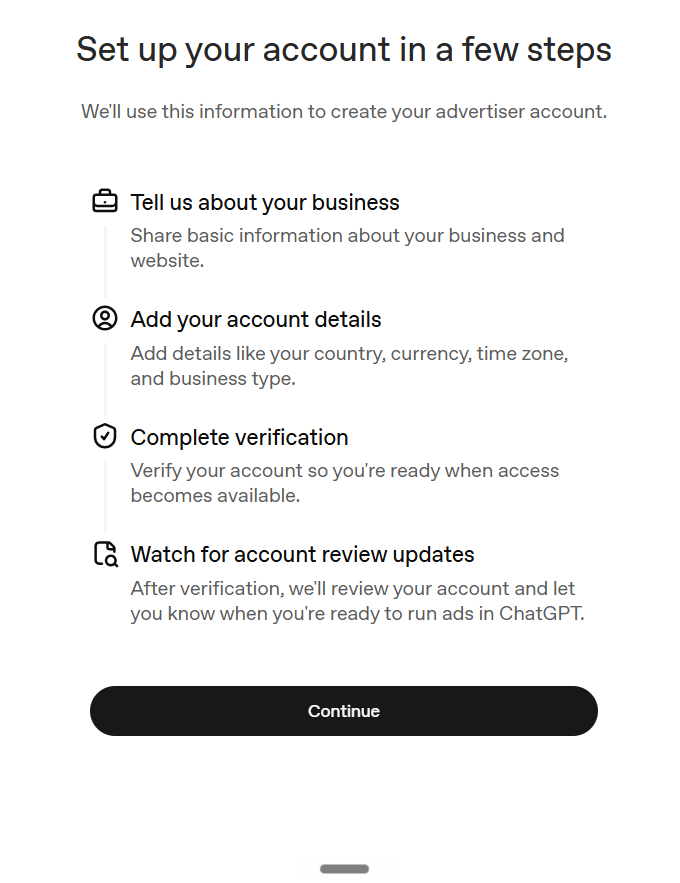
Start by signing in with your OpenAI account. If you don’t already have advertising access, you’ll need to submit a request through OpenAI and complete the required business verification process. Depending on your business, you may be asked to provide information such as:

  • Business name
  • Business website
  • Business address
  • Tax or business identification information
  • Payment method

Verification helps ensure advertisers are legitimate and comply with OpenAI’s advertising policies.

Setting up your ChatGPT ad account.

Step 2: Set Up Billing

Before launching campaigns, add a payment method to your account and review your billing settings. You’ll also set your campaign budget and bidding strategy during campaign creation.

Step 3: Install the OpenAI Pixel

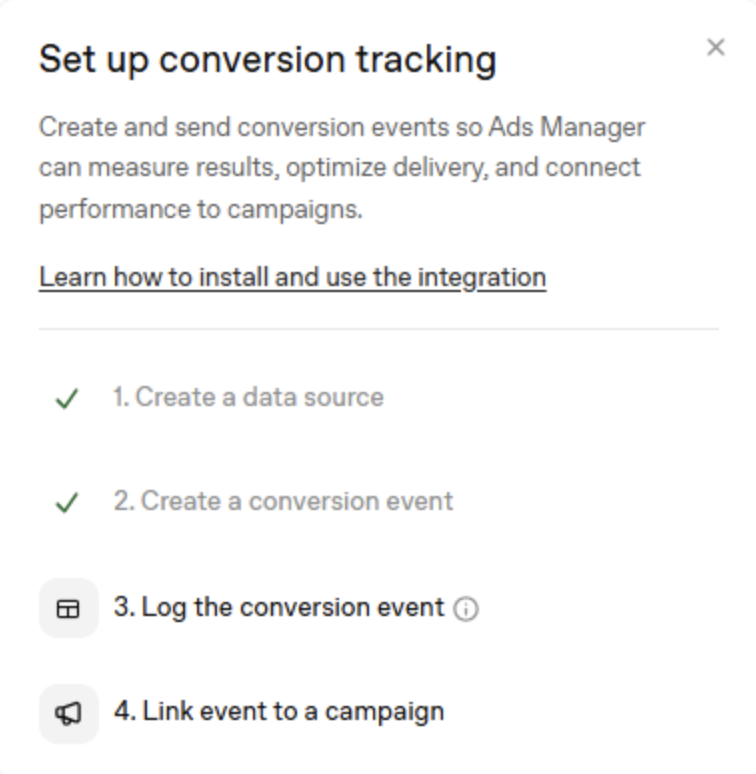
If you plan to track conversions, install the OpenAI Pixel on your website before launching campaigns. The pixel allows you to measure when users interact with your ads and then proceed to take actions such as purchases, lead form submissions, newsletter signups, and other conversion events.

Step 4: Create Your First Campaign

Once your account is configured, you’re ready to build your first campaign by selecting a campaign objective, creating ad groups, defining your targeting, uploading creative assets, and publishing your ads.

Campaign Objectives

Every ChatGPT Ads Campaign starts by selecting a campaign objective. Your objective tells the platform what you want to achieve and helps optimize ad delivery toward that goal. The three primary campaign objectives currently available are:

1. Reach Campaigns

Reach Campaigns are designed to maximize the number of people who see your advertisement. Rather than focusing on clicks or conversions, the platform prioritizes showing your ad to as many relevant users as possible within your selected audience and budget.

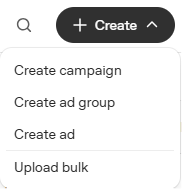
Creating a ChatGPT ad campaign, group, or ad.

Advantages

  • Maximizes visibility.
  • Helps build brand recognition.
  • Ideal for introducing new businesses or products.

Limitations

  • Doesn’t prioritize website traffic.
  • May not generate immediate leads or sales.
  • Performance is measured primarily through impressions and reach.

2. Click Campaigns

If your goal is driving traffic to your website or landing page, Click Campaigns are the better option. Instead of optimizing for impressions, ChatGPT Ads attempts to show your advertisements to users who are more likely to click and visit your destination. This objective works well when your website contains additional information, downloadable resources, or products that require users to continue their customer journey outside ChatGPT.

Advantages

  • Encourages website visits.
  • Useful for generating qualified traffic.
  • Supports content marketing initiatives.

Limitations

  • Clicks don’t necessarily translate into conversions.
  • Landing page quality still plays a significant role in campaign success.

3. Conversion Campaigns

If your focus is encouraging users to complete a specific action on your website after interacting with your ad, use Conversion Campaigns. These actions are defined as conversion events. They can include submitting a lead form, signing up for a newsletter, making a purchase, requesting a demo, or creating an account. To use this objective effectively, advertisers should have the OpenAI Pixel (or other supported tracking implementation) configured so the platform can measure conversions and optimize future delivery.

Managing ad campaigns in ChatGPT Ads Manager.

Advantages

  • Optimizes toward meaningful business outcomes.
  • Helps improve return on advertising spend.
  • Provides data for ongoing campaign optimization.

Limitations

  • Requires accurate conversion tracking.
  • Usually performs best once campaigns have collected enough data.

Which Campaign Objective Should You Choose?

As businesses continue to adopt ChatGPT in their marketing strategies, advertisers have new opportunities to reach potential customers through conversational AI. Once you’re ready to launch a campaign, the first step is choosing the right objective based on your marketing goals.

Objective Best Used For Primary Metric
Reach Brand Awareness Impressions & Reach
Clicks Website Traffic Clicks & CTR
Conversions Leads & Sales Conversions & CPA

For businesses just getting started with ChatGPT Ads, a Reach Campaign can be a useful way to introduce a brand and gather initial performance data. As conversion tracking is implemented and campaigns mature, advertisers can begin testing Click and Conversion objectives to support more measurable business outcomes.

Campaign Structure

Like most advertising platforms, ChatGPT Ads uses a three-level campaign structure to help organize your advertising efforts.

  1. Campaign: This is where you define your campaign objective, budget, bidding strategy, and overall settings.
  2. Ad Group: Ad Groups organize ads based on targeting, audience, or messaging. A single campaign can contain multiple Ad Groups.
  3. Ads: Ads are the individual creatives shown to users. Each ad includes elements such as a headline, description, image, destination URL, and call-to-action.

This structure allows advertisers to organize campaigns efficiently while testing different audiences and creative variations.

Budget in ChatGPT Ads

Once you’ve selected your campaign objective, the next step is deciding how much you want to spend and how ChatGPT Ads should bid in the advertising auction. Budget and bidding work together to determine how often your ads are shown and how competitive they are against other advertisers.

Setting the right budget and bidding strategy can help maximize campaign performance while keeping advertising costs under control.

Daily Budget

A daily budget is the maximum amount you’re willing to spend each day. Once your campaign reaches that limit, your ads will stop serving until the next day. Daily budgets are useful if you want consistent spending over time or are testing a new campaign with a controlled budget.

Campaign Budget

A campaign budget is the total amount you’re willing to spend throughout the entire campaign. Instead of limiting spend each day, ChatGPT Ads distributes your budget over the campaign’s duration to help achieve your selected objective.

Understanding Bidding in ChatGPT Ads

Every time an ad becomes eligible to appear, ChatGPT Ads uses an auction to determine which advertisement is shown. Your bid tells the platform the maximum amount you’re willing to pay to achieve your campaign objective.

While higher bids make your campaign more competitive, they don’t automatically guarantee your ad will be shown every time. Factors such as audience availability, competition, and campaign settings also influence delivery.

Cost Per Click (CPC)

Cost Per Click (CPC) is the amount you pay when someone clicks on your advertisement. With Maximum CPC Bidding, you set the highest amount you’re willing to pay for a single click. If the actual cost is lower than your maximum bid, you’ll only pay the lower amount. CPC bidding is ideal for campaigns focused on driving website traffic or encouraging users to learn more about your products or services.

Cost Per Mille (CPM)

Cost Per Mille (CPM) refers to the cost of 1,000 ad impressions. Instead of paying for clicks, advertisers pay for the number of times their ads are displayed to users. CPM bidding is commonly used for brand awareness campaigns where maximizing visibility is more important than immediate clicks or conversions.

Choosing the Right Bid Strategy

The best bidding strategy depends on your campaign objective.

Reach Campaigns Typically benefit from CPM bidding, since the goal is to maximize visibility.
Click Campaigns Often perform best with CPC bidding, as advertisers pay only when users click their ads.
Conversion Campaigns Should be optimized based on your conversion goals and tracking setup, allowing the platform to prioritize users who are more likely to complete valuable actions.

As with any advertising platform, it’s a good idea to monitor campaign performance regularly and adjust your budget or bids based on the results you see.

Conversion Tracking in ChatGPT Ads

Running a successful campaign isn’t just about generating impressions or clicks. It’s about understanding what users do after interacting with your ads. Conversion tracking helps advertisers measure valuable actions and evaluate whether their campaigns are achieving their marketing goals.

By tracking conversions, businesses can make more informed decisions, optimize campaigns, and better understand their return on investment.

OpenAI Pixel

The OpenAI Pixel is a small piece of tracking code installed on your website that records user actions after they interact with your advertisements.

Once installed, the pixel can help measure activities such as:

  • Purchases
  • Lead form submissions
  • Newsletter signups
  • Account registrations
  • Other valuable website actions

This data allows advertisers to understand how their campaigns are performing beyond clicks and impressions.

Setting up conversion tracking for ChatGPT ads.

Conversion Events

A conversion event is a specific action you want users to complete after clicking your ad. During campaign setup, advertisers can create and assign conversion events based on their business goals. Common conversion events include:

  • Purchasing a product
  • Submitting a contact form
  • Requesting a demo
  • Signing up for a newsletter
  • Creating an account

Tracking these events helps advertisers identify which campaigns, audiences, and creatives are driving the best results.

Event Stream

The Event Stream records the conversion events collected by the OpenAI Pixel, providing advertisers with a view of how users interact with their website after engaging with an ad. This information can be used to analyze campaign performance, identify trends, and make data-driven optimization decisions.

Why Conversion Tracking Matters

Without conversion tracking, advertisers can see how many people viewed or clicked on an ad, but they won’t know whether those interactions led to meaningful business outcomes. Setting up the OpenAI Pixel and defining conversion events allows marketers to measure campaign success more accurately and continuously improve their advertising strategy.

Get Started with ChatGPT Ads

The platform is still new, so a lot of what counts as “best practice” right now is really just early guesses; even OpenAI is still adjusting things as they go, from bidding options to how targeting actually works. That’s why it’s worth treating your first campaign as a test rather than a real push: pick one objective, get your tracking set up properly, and let it run for a few weeks before you commit a real budget or start optimizing. During that window, pay attention to surface numbers, how your audience responds to different messaging, whether certain conversion events show up more than others. You’ll learn more from watching how your specific audience actually responds than from anything else this early on, and those results should guide what you change next.

Flynn, CEO
Flynn stands and smiles in the New Orleans office. He's wearing a branded Online Optimism sweatshirt.

Looking for help with your presence on ChatGPT?

Join us for our Hops and Handshakes speed networking event on August 5!