
The cybersecurity landscape is always on the move, with new vulnerabilities and corresponding patches cropping up one after another. We use a range of overlapping solutions to protect our website and our clients’ sites, from customized built-in features to security plugins to hosting configuration, but in a world where AI-accelerated reconnaissance helped enable an 89% increase in cyber attacks and a 65% increase in breakout speed from 2024 to 2025, you need all the Swiss cheese you can get. So we took a critical look through our own site this summer to find three more places we could layer in a little extra safety.
An Update a Day Keeps the Exploits Away
Keeping everything up to date — plugins, themes, and the WordPress version — is crucial for security. New updates patch known vulnerabilities so that when an attacker arrives on your site to exploit one, the opportunity is already gone.
![An edited screenshot from the video game Silent Hill 2 (2024) in which the protagonist looks at a papered-over window with large letters written on it. The text on the window has been altered to read "There was a [WordPress vulnerability] here. It's gone now".](https://onlineoptimism.com/wp-content/uploads/2026/08/silent-hill-2-cybersecurity.png)
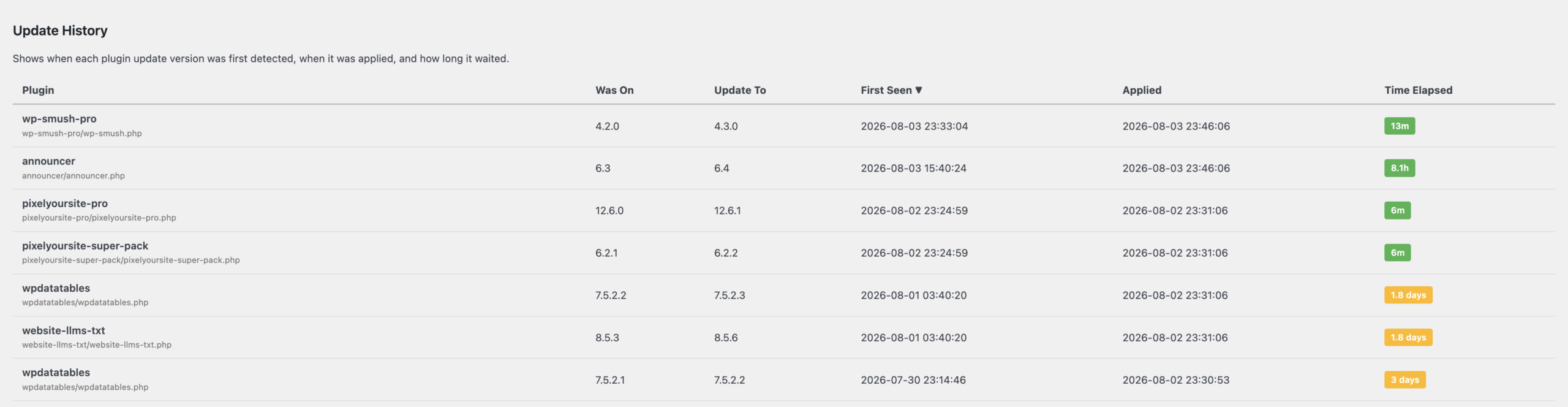
We run our hosting platform’s Smart Plugin Manager add-on every week to automatically check for and install new updates, with safety checks like backups, email notifications, and visual regression testing to make sure no updates introduce compatibility issues that break site layouts. But a week can be a long time in cybersecurity, so I put together a little custom plugin to monitor the time between the moment a plugin update first became available in the back end and the moment it was actually installed. Sure enough, if a plugin had the bad luck for its new update to become available right after the weekly run, it had to wait until the next week for the update to be installed.
I switched our schedule to run every weekday (still in the early morning when the site has low traffic, just before I clock in), and the wait is much better now: at most, a plugin has to wait 3 days, and that’s if a new update comes in on Friday after the daily run and doesn’t get installed til Monday. Most of the time, updates are now discovered and installed in under 24 hours!
Don’t Trust, Just Verify
At Online Optimism, we have a very sensible, internet-savvy team who wouldn’t be caught dead using “password123”, and a basic simulated attack didn’t crack any passwords… but it’s dangerous to assume the best when one new team member’s weak or reused password can create a window for attackers to break into your site.
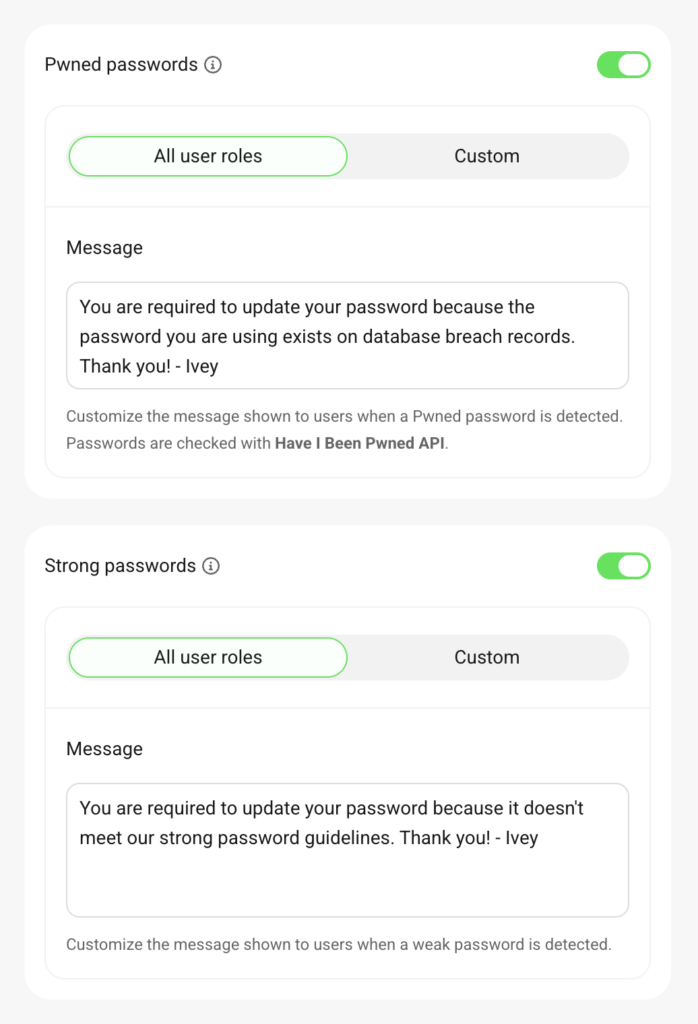
We upped our user password protection to a zero-trust approach with two features from WP Defender, a plugin we already use for other security monitoring:
- We enforced strong passwords, so that new users were required to create strong ones and existing users without strong passwords were required to create new ones at their next login.
- We blocked pwned passwords, preventing users from using even a strong password if it was ever detected in a data breach by HaveIBeenPwned.
It’s a small update, but 39% of all data breaches tracked by Verizon in 2026 involved credential abuse at some level, and on the WordPress-specific side, a 2024 Cloudflare study found that 52% of all detected WordPress login requests used leaked passwords flagged by HaveIBeenPwned — passwords that our new password settings will prevent anyone from ever using on our site.
WP Defender’s audit logs allow us to monitor all user activity on the site, so our site admin team can keep track of who makes what changes and when — and while I’m not naming names, a few users did update their passwords shortly after the rules went into place. Windows = locked.
Hook It Yourself
Among its other handy features, WP Defender compares incoming IP addresses against blocklists, including their AntiBot Global Firewall, and immediately blocks malicious users or bots before they can even start to cause problems. Separately, it tracks and flags various categories of 404 errors, encompassing everything from regular mistyped URLs to attempts to access plugin or theme files that don’t exist.
The built-in settings allow you to block 404 culprits, either immediately or after a certain number of attempts. Since we don’t want to kick people out for a single typo, but we do want to limit the bandwidth wasted by a bot repeatedly slamming an endpoint, we split the difference: try to access a nonexistent URL 10 times in 5 minutes, and you’re out. Anything less than that, and we’re willing to assume you might be a human who accidentally pasted half a URL.
But what about those 404s where someone attempts to access files for a theme or plugin? That’s a different risk from a regular 404 — after an unauthenticated admin account creation vulnerability was found in the WP Maps Pro plugin, we saw an uptick in attempts to access that specific plugin’s folder, even though it wasn’t installed on our site. Attackers were scanning for opportunities to break in and create their own admin accounts, and they didn’t need 10 attempts to see that that plugin wasn’t available before testing a different route.
WP Defender’s 404-blocking settings aren’t granular by design, so we couldn’t opt to immediately block the plugin and theme attempts without also immediately blocking anyone who mistyped a URL (which obviously wasn’t acceptable). But we did have all the puzzle pieces we needed: we had the log flags for these plugin and theme attempts versus other 404 errors, and we had the ability to implement a block with WP Defender’s
wd_blacklist_this_ip action hook. All we had to do was put them together: when WP Defender flags a 404, check if they flagged it as one of these non-installed theme/plugin attempts, and if it is, block that IP right away.
//Make Defender Pro auto-ban IPs that attempt to access non-installed themes or plugins
add_action( 'wd_404_attempt', 'oo_ban_attempts_at_non_installed_access', 10, 3 );
function oo_ban_attempts_at_non_installed_access( $model, $scenario, $uri ){
    if ( strpos($scenario, 'plugin_attempt' ) !== false || strpos($scenario, 'theme_attempt' ) !== false ) {
        do_action( 'wd_blacklist_this_ip', $model->ip );
    }
}
We added some extra features to our snippet so we’d have notifications and records of whenever this connecting function ran, and then set it up on the site. Comparing the two weeks before adding the snippet and the two weeks afterwards, we saw an 82% decrease in non-installed file access attempts!
And as a bonus, we saw our Google Analytics engagement averages go up. When a malicious bot hits its target and gets a 404, it bounces to the next target immediately, and your analytics dashboard sees it as a visitor who wasn’t interested enough to stay. When the bot gets blocked on the first attempt, it can’t repeat the process, so the total number of website visitors who arrive-and-bounce decreases, and more accurate engagement numbers emerge. Our overall website views dropped 18%… and average engagement time per user rose by 54%.
Go Forth and Fortify
We spent quite a while studying the site logs, researching exploit types, and deciding on the best way to approach these fixes — but actually implementing them took next to no time at all. If you’ve been putting off improving your WordPress security, take a few minutes today and ramp up your update frequency, set some strong password requirements, or block that bot traffic that’s been clogging up your analytics. You never know where the next vulnerability will come from (even WordPress Core itself isn’t immune, as we all just saw last week), and every small improvement closes up another potential entry point in your website’s attack surface.
And if your website needs a stronger rebuild from the ground up, give us a call! We build sites that are secure, responsive, functional, and creative — and we stick around after launch to provide maintenance, support, and extra eyes (both automated and human!) to look out for you.